
When it comes to capturing real-world spaces with precision, the software you use is just as important as the scanner in your hand. Today’s 3D scanning and modeling software doesn’t just visualize geometry it translates millions of LiDAR data points into meaningful digital models that engineers, architects, and facility managers can actually use.
At Arrival 3D, we rely on these tools every day to deliver as-built documentation, digital twins, and BIM-ready models for everything from industrial refineries to historic landmarks. This guide walks through the most trusted software in the field, why it matters, and how it shapes your project outcomes.
What Is 3D Scanning & Modeling Software?
In simple terms, 3D scanning software converts physical spaces into digital data. It takes raw point clouds collected from LiDAR scanners like the Leica RTC360, BLK360, or NavVis VLX and aligns, filters, and merges them into a cohesive 3D dataset.
From there, modeling software transforms those scans into editable CAD or BIM models that reflect real-world conditions with millimeter-level accuracy.
A typical workflow looks like this:
- Capture: Field teams collect laser scans or photogrammetry data.
- Register: The software aligns multiple scans into a single coordinate system.
- Clean: Noise and irrelevant objects are removed.
- Model: The processed data is converted into 3D models or 2D deliverables.
- Deliver: Files are exported into Revit, AutoCAD, or Navisworks for design, coordination, or facility management.
Why Software Selection Matters
Not all software handles LiDAR data the same way. The right choice depends on your industry, data volume, and end goal. Here’s what defines a powerful platform:
- Accuracy: High-end tools maintain sub-millimeter precision through advanced registration algorithms.
- Speed: Automated workflows cut down processing time from days to hours.
- Integration: Smooth compatibility with BIM and CAD platforms saves endless rework.
- Scalability: Industrial and infrastructure scans often exceed hundreds of gigabytes—software must handle that load effortlessly.
- Visualization: Cloud-based viewers allow clients and teams to explore scans remotely.
The software you pick determines how fast your team can move from raw point cloud to usable insight.
Top 3D Scanning & Modeling Software in 2026
| Software | Best For | Highlights | Output Formats |
|---|---|---|---|
| Autodesk ReCap Pro | Scan registration & point-cloud management | Automated alignment, Revit/AutoCAD integration, cloud sharing | RCP, RCS |
| Trimble RealWorks | Infrastructure & plant analysis | Surface deviation, segmentation, feature extraction | LAS, E57, DXF |
| Artec Studio 20 | Small object & handheld scanning | AI alignment, texture mapping, photogrammetry module | OBJ, STL, PLY |
| Geomagic Design X / Freeform Plus | Reverse engineering | Converts scans to parametric CAD models, precision surface fitting | STEP, IGES, SolidWorks |
| Rhino 8 + CloudCompare | Architecture & heritage modeling | NURBS + mesh editing, Grasshopper automation | 3DM, DWG, IFC |
| Leica Cyclone REGISTER 360 | Industrial facility scanning | Rapid registration, automatic QA reports, TruView cloud publishing | PTX, E57 |
| FARO Scene | Building interiors & mechanical spaces | Real-time visualization, scan alignment, panoramic review | LSPROJ, PLY |
1. Autodesk ReCap Pro — The BIM Standard
ReCap Pro remains a cornerstone of Scan-to-BIM workflows. Its native compatibility with Revit, AutoCAD, and Navisworks makes it the go-to choice for architects and engineers documenting existing conditions.
Why it stands out:
- Automatic registration of multiple scan stations.
- Clean editing and region-based cropping.
- Direct upload to Autodesk Docs for team collaboration.
Perfect for: Construction professionals and MEP designers creating accurate as-built models.
2. Trimble RealWorks — Built for Big Data
Trimble RealWorks excels at handling massive infrastructure datasets. It’s designed for projects where precision alignment and analytical reporting are critical.
Key strengths:
- Surface-to-surface deviation analysis.
- Volume calculations and cross-section tools.
- Tight integration with Trimble Business Center and SketchUp.
Perfect for: Surveyors, civil engineers, and plant managers managing large geospatial datasets.
3. Artec Studio 19 — Smart & Simple
Artec Studio delivers an intuitive interface powered by AI-assisted automation. It’s widely used for product design, heritage scanning, and reverse engineering of smaller components.
Highlights:
- Real-time 3D alignment while scanning.
- Seamless blend of LiDAR and photogrammetry data.
- Easy export to CAD/CAM software.
Perfect for: Designers and engineers working on small-scale or artifact-level projects.
4. Geomatic Design X — Reverse Engineering Reimagined
When a project calls for editable CAD geometry rather than mesh surfaces, Geomagic Design X is the gold standard. It transforms point clouds into parametric models compatible with SolidWorks, Inventor, or NX.
Strengths:
- Converts scans into NURBS and solid geometry.
- Captures design intent for manufacturing or retrofits.
- Powerful for quality inspection and precision components.
Perfect for: Manufacturers, aerospace, and mechanical retrofits.
5. Rhino 8 — Creative Control for Complex Geometry
Rhinoceros 8, combined with Grasshopper and CloudCompare, is an exceptional choice for architectural design and cultural heritage documentation.
Advantages:
- Handles millions of points smoothly.
- Great for sculptural or irregular geometry.
- Supports parametric modeling and IFC exports.
Perfect for: Architects, restoration specialists, and heritage conservators.
6. Leica Cyclone REGISTER 360 — Speed & Accuracy Combined
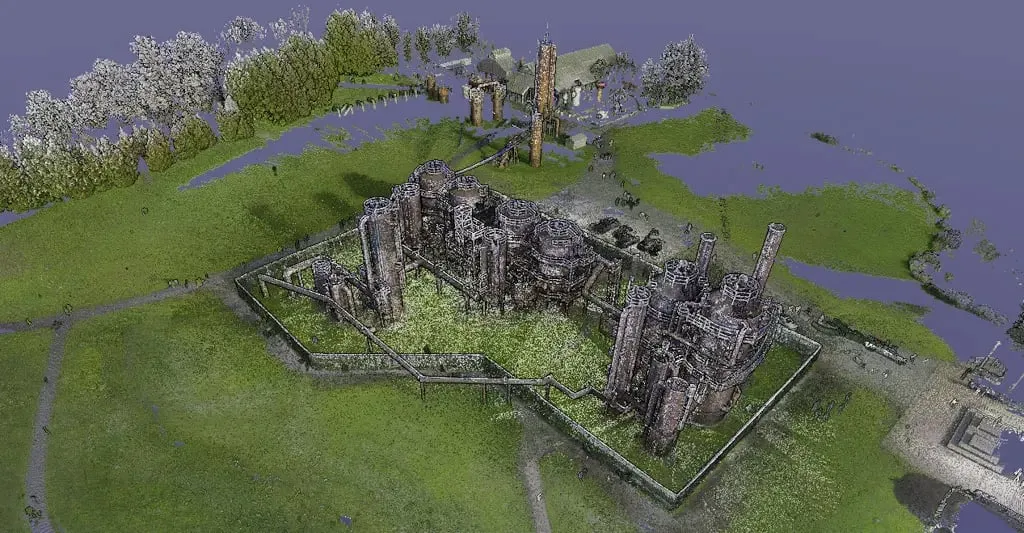
At Arrival 3D, we often rely on Cyclone REGISTER 360 for our industrial and plant scanning projects. It’s engineered for fast, automated registration while maintaining sub-millimeter accuracy.
Why it’s essential:
- Cloud-to-cloud registration in minutes.
- Integrated QA reporting for traceability.
- Seamless upload to TruView Cloud for panoramic visualization.
Perfect for: Oil & Gas facilities, industrial sites, and multi-level structures.
How Arrival 3D Combines These Tools
Our workflow integrates multiple software platforms to deliver comprehensive results:
| Process Step | Software | Purpose |
|---|---|---|
| Scan Registration | Leica Cyclone REGISTER 360 | Align and clean raw LiDAR data |
| Point-Cloud Optimization | Autodesk ReCap Pro | Organize, crop, and tag datasets |
| Modeling & BIM Conversion | Revit / Rhino / Geomagic | Generate LOD 200–500 as-built models |
| Visualization & Delivery | TruView Cloud / Navisworks | Share interactive, measurable digital twins |
This blended workflow ensures accuracy, speed, and interoperability across every deliverable.
Industries That Benefit Most
️ Construction & BIM
3D scanning eliminates guesswork in renovation or retrofit projects, giving design teams precise as-built data before they start modeling.
️ Oil & Gas
Industrial facilities rely on digital twins for maintenance planning, safety audits, and expansion coordination.
️ Heritage Preservation
Scanning delicate artifacts and historic structures creates permanent digital archives for restoration and education.
⚙️ Manufacturing
Reverse engineering and dimensional verification streamline production and quality control.
Emerging Trends in 3D Scanning Software
- AI-Driven Automation: Machine learning speeds up registration and feature extraction.
- Cloud Collaboration: Web platforms allow instant scan sharing and markup.
- Mixed Reality Visualization: VR and AR integrations enable immersive project reviews.
- Open Data Standards: Formats like E57 and IFC improve interoperability across platforms.
Final Thoughts: Precision Starts with the Right Software
Every great model starts with great data — but only the right software turns that data into value. Whether it’s ReCap Pro for BIM coordination, Cyclone for plant scanning, or Geomatic for reverse engineering, each platform plays a critical role in your reality-capture ecosystem.
At Arrival 3D, we combine cutting-edge scanning equipment with best-in-class software to deliver high-accuracy as-built documentation and digital twins nationwide.
Ready to Capture Your Site in 3D?
Talk to the experts at Arrival 3D.
We’ll help you choose the right approach — from on-site LiDAR scanning to final 3D modeling — tailored to your project’s needs.
Explore Our 3D Laser Scanning Services
Learn About Scan-to-BIM Workflows