
Walk through any power plant that’s been running for twenty or thirty years and you’ll see it right away. Pipe racks, ductwork, steel and equipment crowd into the same space. A good share of it went in long after the original drawings were stamped. That’s fine until someone has to design a retrofit. Then the question is simple: what is actually out there today? The drawings in the file cabinet often can’t answer it. 3D laser scanning can. We capture the plant as it stands, register the scans into a point cloud, and turn that data into power plant as-built drawings, CAD models, or BIM models your engineers can design against. At Arrival 3D, we’ve used this workflow on power generation projects where new equipment had to fit into tight, crowded areas.
What Are Power Plant As-Built Drawings?
As-built drawings show a facility the way it really exists, not the way it was designed. In a power plant, that means the true location and geometry of piping, structural steel, equipment, ductwork, platforms and supports within the area you care about. The difference matters. Design drawings show intent. As-builts show reality on the day of the survey, including every change made since startup.
Why Old Drawings Stop Matching the Plant
Plants run for decades, and they don’t sit still. Pumps get swapped, lines get rerouted, a platform goes in for maintenance access, a new system gets tied in during an outage. Plenty of those field changes never make it back into the drawing set. Nobody is being careless. Outage schedules are tight, and updating CAD files is rarely the top priority.
The gap shows up later, usually at the worst time. A designer works from a drawing that’s a few modifications out of date. Then a clash turns up during fabrication or, worse, when a crew is trying to set the new equipment. Starting from current field conditions avoids most of that.
How 3D Laser Scanning Captures Existing Conditions
A terrestrial laser scanner sits on a tripod and records millions of points around it, each with a precise position in space. One setup only sees what’s in its line of sight, though. In a plant full of pipe, steel and equipment, we move the scanner to many positions so each area gets covered from several angles.
Back in the office, those individual scans are registered (stitched together) into a single point cloud of the area. Instead of a notebook full of tape measurements, your team gets a dense 3D record of everything the scanner could see. Need a dimension three months later? Measure it from the data instead of sending someone back out to the unit.
Point Cloud to CAD: Turning Scan Data Into Drawings
The scan is the raw material. The value comes from what gets built from it. After registration and a quality check, our modelers use the point cloud as a reference to produce the deliverable your project needs. That might be 2D as-built CAD drawings, a 3D CAD model, a Revit model, or just the registered point cloud for your own design team.
We settle the deliverable before anyone mobilizes. It decides where the scanner goes, how much detail has to be captured, and how long modeling will take. Changing it after the fieldwork is done can mean a second trip to the site.
Case Study: Scanning a Power Plant Exhaust System for a Scrubber Install
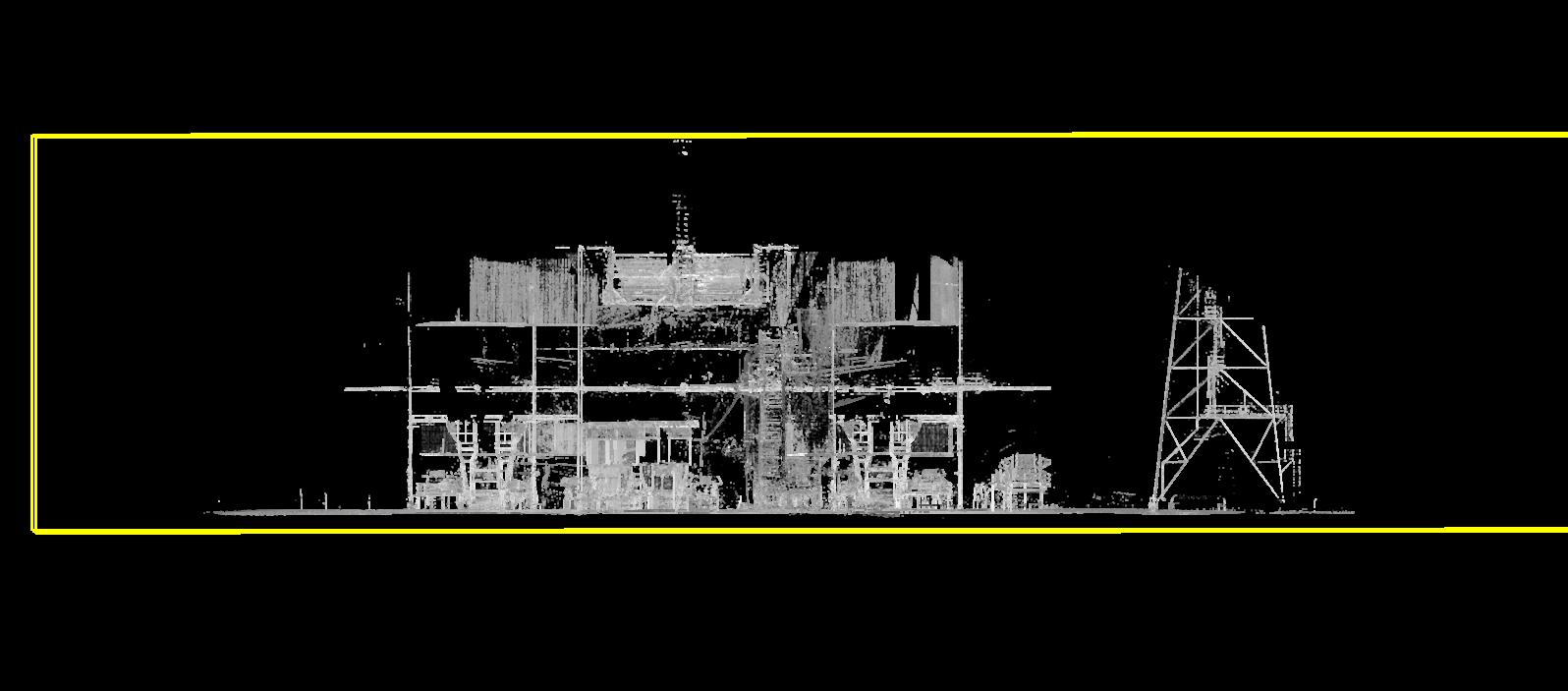
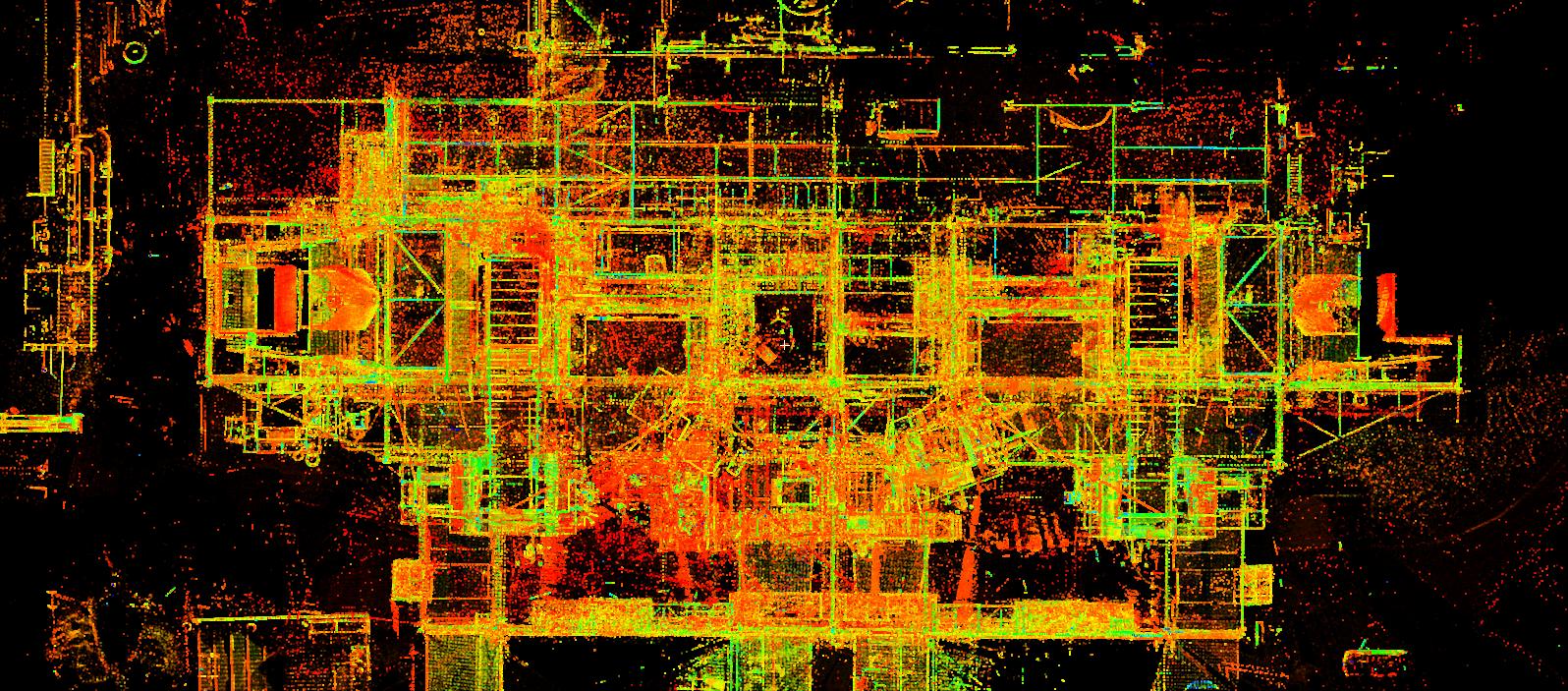
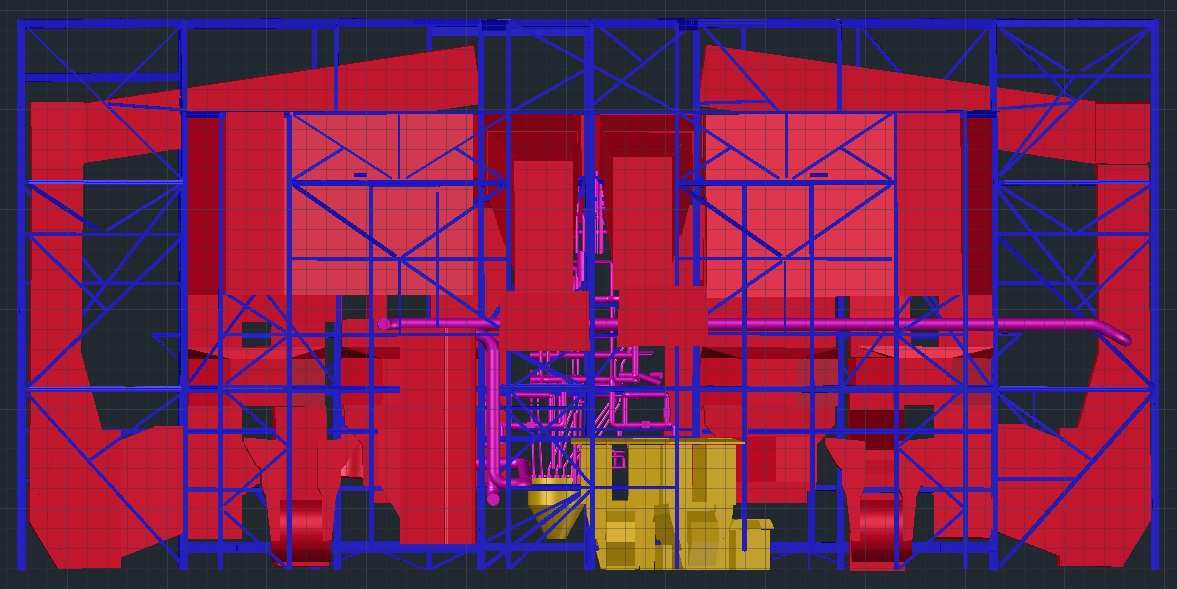
A gas-fired facility was planning to add a scrubber system to the exhaust section of the plant. The engineering team needed to know exactly what the new equipment had to fit around. They didn’t trust the existing drawings enough to design from them alone.
Our crew spent approximately three days scanning the exhaust area using a Leica RTC360, capturing the existing equipment, structural elements, piping, and surrounding conditions in detail. The scanning was coordinated with the facility team to minimize disruption to ongoing plant operations.
We registered the scans into a single point cloud and used it as the reference for a 3D CAD model of the existing conditions, built in Revit software at LOD 350. The engineering team then laid out the scrubber installation against that model rather than against old drawings.
What a Power Plant Scan Can Document
If the scanner can see it, it can be captured: piping, structural steel, equipment, ductwork, platforms and stairs, supports and hangers, floor and wall geometry, penetrations, and access routes. Insulated pipe gets captured at its outside surface, and anything hidden behind walls or lagging needs another method.
The relationships between objects often matter as much as the objects themselves. A new skid can fit on paper and still hit a pipe rack overhead. It can also block the clearance a maintenance crew needs. A full 3D dataset lets designers check those conflicts before anything is fabricated. On an industrial machinery project in Paducah, KY, we built nine LOD 350 Revit models from about 22 billion scan points so the client could run clash detection before planning upgrades.
How As-Built Data Supports Retrofits and Upgrades
Retrofits are where power plant retrofit scanning pays for itself. New work has to fit around old work, and the scan shows exactly where the old work is. Teams use the data for:
- Equipment replacement: document the existing unit and its surroundings before the replacement is designed. At USG’s Torrance plant, we scanned three silos and the tight spaces below them. The LOD 200 Revit model and 2D DWG drawings let engineers replace equipment without redesigns or delays.
- System modifications: see how existing systems relate to each other before rerouting or tying in.
- New equipment installation: check how proposed equipment fits in the available space, including access and clearances.
- Structural modifications: give structural engineers measured geometry of the existing steel, as we did for a conveyor structure on a pier in Hoquiam, WA.
- Construction coordination: give the owner, engineer and contractor one shared model to work from, instead of separate sets of field notes. After we scanned and modeled a food production plant in Fall River, MA, the client cut renovation time by 33% and errors and rework by 80%.
A scan doesn’t replace engineering judgment or field verification of critical tie-in points. It gives the engineers far better information to apply that judgment to.
Common Deliverables
Not every project needs the same output. Some engineering firms only want the registered point cloud because they do their own modeling. Others need finished as-built documentation. Typical power plant 3D scanning deliverables include:
- Registered point cloud (e.g. E57, RCP/RCS)
- 2D as-built CAD drawings: plans, elevations, sections
- 3D CAD models of piping, steel and equipment
- BIM/Revit models
- Measurements and existing-condition reports
Tell us the deliverable and the software your team uses, and we’ll plan the field capture around it.
What Drives Accuracy
“Accurate” gets thrown around a lot in this industry, so here’s what actually controls it.
- The scanner. Each instrument has a rated range and point accuracy. We match the scanner to the job.
- Registration. How the scans are tied together (targets, cloud-to-cloud, or both) affects how well distant parts of the cloud line up.
- Survey control. If the data has to sit in your plant coordinate system, we tie it to known control points.
- Coverage. Areas seen from only one angle are less reliable than areas seen from several.
- Modeling tolerance. A CAD model is an interpretation of the cloud, so the modeling tolerance should be agreed up front.
We write the required tolerances into the scope before fieldwork starts, so everyone knows what the data can and can’t be used for.
Scanning an Operating Plant Safely
Most plants can’t shut down just because someone wants a survey. Scanning works well in a running facility, with a few things planned for. We’ve done it at scale: our crews scanned 25 active package sorting centers, about 4 million square feet in all, with off-hours scheduling to avoid disrupting operations.
- Site safety: our crew completes your site orientation and follows your PPE and permit requirements.
- Hot and vibrating areas: heat shimmer and vibration can add noise, so we plan scan positions and settings around them.
- Restricted zones: we work with your operations team on access and escorts.
- Outage windows: some areas, like inside a boiler or a duct, can only be reached during an outage. We can split the work so the rest is scanned beforehand.
Planning a Power Plant 3D Scanning Project
A good scan starts with a clear scope. Before mobilizing, settle these questions with your team:
- Which areas need to be captured?
- Which systems or equipment matter most?
- What deliverables are needed, and at what level of detail?
- Does the data need to match an existing plant coordinate system?
- Are there restricted or hard-to-reach areas?
- Will the plant be running during the scan?
- Which file formats and software does the design team use?
For large plants, splitting the work into scan zones that follow the engineering scope keeps fieldwork and modeling manageable.
Power Plant 3D Scanning With Arrival 3D
Every plant modification starts with the same question: what’s really there today? We answer it with 3D laser scanning for power plants and industrial facilities, and we deliver the data in whatever form your engineers need, from a registered point cloud to finished as-built drawings and models.
Planning a retrofit, an equipment replacement or an as-built update? See our Power Plant 3D Laser Scanning services or request a quote to talk through scope and deliverables with our team.
More industrial scanning projects from our team:
- 3D laser scanning of USG Torrance plant silos
- 3D laser scan of industrial machinery
- 3D scan of a food production plant
- 3D laser scan of a conveyor structure
- 3D scanning of 25 sorting centers across the USA
Frequently Asked Questions
Can 3D laser scanning be used to create power plant as-built drawings?
Yes. The scanner captures existing geometry as a point cloud, and modelers use that cloud as the reference for 2D CAD drawings, 3D models and BIM models.
Why scan instead of taking manual measurements?
Tape measurements work for a handful of dimensions. A crowded plant area has hundreds of related pipes, supports and steel members. A scan captures all of them in one visit, so your designers can measure whatever they need later.
Can you scan while the plant is running?
In most cases, yes. We follow your site safety rules and plan around hot, high-vibration and restricted areas. Areas that are only reachable during an outage can be scheduled separately.
Can an existing point cloud be used for retrofit design?
Usually, as long as it covers the area you need and meets the accuracy and coordinate requirements for the design. If it doesn’t, we can scan the gaps and register them to the existing data.
What deliverables can come from a power plant scan?
Registered point clouds, 2D as-built CAD drawings, 3D CAD models, Revit models, measurements and existing-condition reports. The right one depends on what your design team will do next.
How long does it take to scan a power plant?
It depends on the size of the area, how congested it is, access, and the level of detail required. The exhaust system project above took about three days in the field. Your project could be shorter or much longer.
We then used the point cloud as a reference to extract a 3D CAD model. This was done in two phases; an initial phase where we captured major duct, structures and piping, and a revision of this model to include additional detail in areas of interest.
Do you need an as-built 3D CAD model for your plant using 3D scanning services? If so, please call 866-687-7784.